


• This thread is just the tip of the iceberg.The people ahead of the curve aren't Googling for answers — they're already in here, having the conversations you haven't found yet. DealerRefresh is free.Get the full picture →

Data Studio Help!

wmrcs

Push Start
May 10, 2018
11
3
Awards
1
First Name
Will
Any ideas as to why the organic search sessions in Data Studio differs from my GA data? I've tried filters and can't get it to match up.

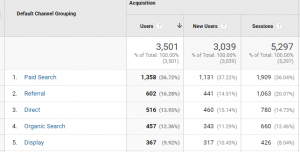
My Organic Search sessions should be 660:
upload_2018-11-28_11-13-48.png

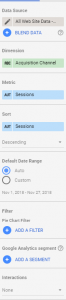
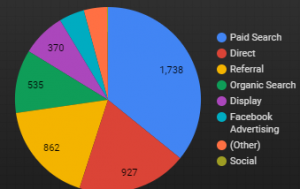
When I import data to Data Studio using the following settings, my number's off by about 100 sessions.
upload_2018-11-28_11-15-4.pngupload_2018-11-28_11-15-18.png

What am I missing here?
 
Are you certain that you're using the same Google Analytics 'View" and date/time range?

Also, you could try setting the Dimension (the green one) in Data Studio to 'Default Channel Grouping' instead of 'Acquisition Channel'.

My data studio numbers are regularly imperfect, but usually only +-5 off, not 100.
 
Are you certain that you're using the same Google Analytics 'View" and date/time range?

Also, you could try setting the Dimension (the green one) in Data Studio to 'Default Channel Grouping' instead of 'Acquisition Channel'.

My data studio numbers are regularly imperfect, but usually only +-5 off, not 100.

Thanks Nick, Default Channel Grouping fixed it...!
 
  • Like
Reactions: AWNick

✨ AI Highlights

A user troubleshoots a 100-session discrepancy between their Google Analytics organic search data and Data Studio reporting. The issue is resolved by switching the dimension from "Acquisition Channel" to "Default Channel Grouping" in Data Studio, suggesting that different channel grouping methods were causing the data mismatch.

Replies Views 6 2,220 Started Last Reply