• This thread is just the tip of the iceberg.The people ahead of the curve aren't Googling for answers — they're already in here, having the conversations you haven't found yet. DealerRefresh is free.Get the full picture →

Google Chrome Browser - What do you think?

Jeff Kershner

Founder
Staff member
May 1, 2005
5,999
1,913
Awards
12
First Name
Jeff
google_chrome_2.jpg


Have you tried the new
Google Chrome browser
?

I'm having a hard warming up to it for some reason. Not sure if it's the look and feel or what. I feel like I'm on a web page rather an actual browser. I like the most visited feature on the default homepage but and the suggest as you type but I'm not sure I'd be willing to so quickly dump my Firefox over Chrome.

What do you think?

I like the incognito feature!!


Google's Story behind the Google Chrome Browser on YouTube.
 
It definitely has define pros and cons.

My Pros:
- Extremely light and a very short top section make it perfect for mobile browsing. As netbooks become more popular, I suspect people will really start to appreciate how little vertical resolution it takes up.
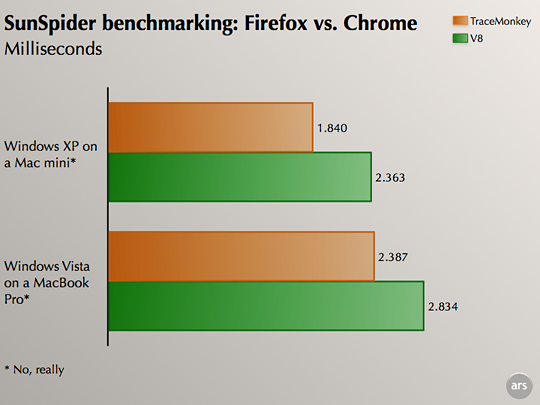
- The speed at which it computes JavaScript is amazing. There are things I've always wanted to implement on our site, but because IE and FF can really hang on complex JS, we couldn't release these features. However, if they can now adobt Chrome's engine, the web will change forever (for better or worse, yet to be determined).
- Incognito mode - interesting addition - Google's cookies are immune to this though.
- GZip works faster than any other browser I've tested.
- When you click on the address bar, the whole thing is selected so you can just start typing. You don't have to double click like in FF or TRIPLE click like in safari.
- All websites seem to load real fast.
- If one tab hangs, it doesn't kill the rest.

My Cons:
- Having it phone home every time you type anything into the address bar.
- There's no Home button at the top by default.
- It's would be tough to move away from FF and all the important extensions I've grown to love.
- It's based on WebKit (the html renderer Safari uses) and therefore about 75% of the websites you visit are going to have alignment issues.
- It scrolls funny when using a mousewheel.
- There's no way to disable JS.
- Anyone can install it on their computer, there's no way to lock it out as an Admin.
 
I am a huge fan of Google, and I downloaded Chrome the day it was released. I was initially impressed by how clean it looked (like Chip). But then I found it to run somewhere between slow, and ridiculously slow. I am sure that it will be killer with an update, or two. I am going to stick to Firefox, for the time being.

Those of you who think it runs fast: what operating system(s) are you using? Maybe it is my crappy Vista... :)
 
First off, no Mac version yet. Come on Google, get there.

Although I am sure future updates will improve upon it, the bookmarking features are incredibly sparse. I'm a very happy Firefox 3.0 user, I love most Google apps, but i'm not switching to a new browser unless it makes a better case than this!
 
Uh, no Google Toolbar!! This was the biggest con (besides the slow speed) for me. I don't want to have to type in google each time I want to search. Or let it guess or go to a new page and click on most visited site google. Try googling "Google Toolbar + Chrome" and you get a million sites saying the same thing...where's the toolbar?
 
I've used Chrome since it was released on my xp computer at work and on my vista computer at home. I still use it, if that means anything about 50/50 (mainly because I still don't know how I feel about it). FYI, you have to enable the home icon in the preferences. Here are my pros and cons.

The good:
- Speed? I don't notice it being so much faster. Maybe a little, but I really can't tell.
- Memory usage!! Uses almost 2.5x less memory than Firefox, IE, or Safari. Very good for older/low mem computers.
- I like how the status bar shows up when it does so you can see what's going on, then disappears when it's blank.
- vertical spacing - how the tabs are near the top, almost in the title bar. Very small titlebar, vista style.
- the ability to drag tabs into a new window, and then back in one it came from again (but who really puts it back in huh?)
-I can copy and past correctly from the browser into excel (I hate how you can't do that w/ firefox).

The bad:
- right click doesn't work w/ google docs, and other weird things w/ it sometimes.
- When I go to download on certain sites, the downloads don't start.
- I've had an error close the whole browser, and not just the tab like it's supposed to do.
- To check if there is an update (so far as I've found out) you have to go to the tools->About. Then it says if a new update is available or not. It would be nice if it just told you.
- If you just type in the address bar it will take you to the web page instead of pulling up the search results.
- Extensions/Themes. There's always hope right?

Anyways, Chrome is a very good browser, I wish that I could use it exclusively (mainly google docs, and downloads sometimes). I would love to see some mozilla type add-ons and themes for it. It will be tough to win firefox users (like me).

 
I like the expandable text boxes...

For those of you with extremely short attention spans & already bored with it - apply a new skin to your GC here: http://elitehudson.com/XChromeP5.zi

Right click in the browser header and access the task manager; I like how Google keeps geeks entertained with the "Stats for nerds" links in the task manager window.

For developers, or those curious, right click on a web page and select "Inspect element" to view HTML, CSS and other dev. element properties.

Cool stuff throughout - its only a rough draft at this point. I can't even image what they have in store for subsequent releases...