
Hey everyone! Glad to be here, been lurking for a bit and this place is genuinely great, tons of real hands-on experience in the discussions.
To introduce myself, I'm software developer and I building a tool for small/mid auto dealers to help with photo processing (the boring repetitive stuff that just takes way too much time).
So, to get to the point, I've been build something that, I hope, could help dealers (or really anyone moving a decent volume of cars a month) save some time on the photo editing. The idea is to get your photos ready for listings on sales platforms (fb marketplace, cargurus, or your own site) and make it more consistent and professional look. Ideally it should be as painless as possible: upload your photos and just forget about it, then download ready images to post.
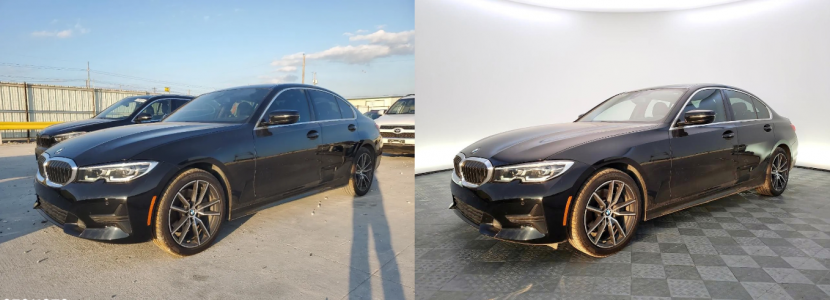
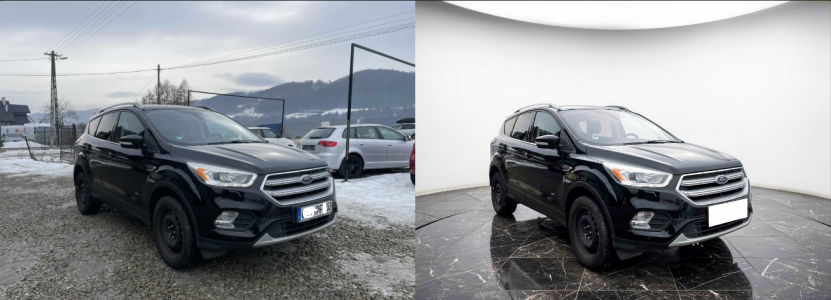
The app works with photos you already have. Right now it does four things: replaces the background with a clean studio look, hides license plates, generates a vehicle ad description, and makes it easy to add your dealership logo. But one more thing worth to mentioning, it uses AI, but it doesn't touch the car itself. So car stays as in original photos and no misleading potential buyer.
So if anyone's up for giving it a try, it'd be great if you could test it against your actual inventory. Run it through your real workflow of posting a car and see how it fits in. App have a built in paywall with 3 free images after registration, but I'll add everyone free access, so no blockers here.
What I'm really hoping to get out of this:
If someone interested, just left adress here carflowai.com. Currently it's available as a desktop web app and on iOS.
ps. left here your mail or dm me, so I can add more credits for free access
pss. I'll reply to every comment, welcome to the discussion!
psss. I Attach couple examples of the app output
To introduce myself, I'm software developer and I building a tool for small/mid auto dealers to help with photo processing (the boring repetitive stuff that just takes way too much time).
So, to get to the point, I've been build something that, I hope, could help dealers (or really anyone moving a decent volume of cars a month) save some time on the photo editing. The idea is to get your photos ready for listings on sales platforms (fb marketplace, cargurus, or your own site) and make it more consistent and professional look. Ideally it should be as painless as possible: upload your photos and just forget about it, then download ready images to post.
The app works with photos you already have. Right now it does four things: replaces the background with a clean studio look, hides license plates, generates a vehicle ad description, and makes it easy to add your dealership logo. But one more thing worth to mentioning, it uses AI, but it doesn't touch the car itself. So car stays as in original photos and no misleading potential buyer.
So if anyone's up for giving it a try, it'd be great if you could test it against your actual inventory. Run it through your real workflow of posting a car and see how it fits in. App have a built in paywall with 3 free images after registration, but I'll add everyone free access, so no blockers here.
What I'm really hoping to get out of this:
- Honest feedback on how the tool actually performs on real inventory photos
- A better understanding of the day-to-day problems dealers run into that I might not even be aware of
- Ideas on what else could make this more useful for your workflow
- A sense of whether the output quality is actually good enough to use in real listings
- Any deal breakers - things that would stop you from using something like this even if it worked perfectly
If someone interested, just left adress here carflowai.com. Currently it's available as a desktop web app and on iOS.
ps. left here your mail or dm me, so I can add more credits for free access
pss. I'll reply to every comment, welcome to the discussion!
psss. I Attach couple examples of the app output