


- Nov 19, 2026
- 3
- 0
- Awards
- 1
- First Name
- danny
Hey all,
I'm a car salesman, and I got tired of re-typing the same vehicle info into Marketplace, Instagram and window stickers. So I built a Chrome extension called Postads4u Studio. I just added two features I think some of you might get use out of, and I'd love honest feedback.
1. Window stickers in one click
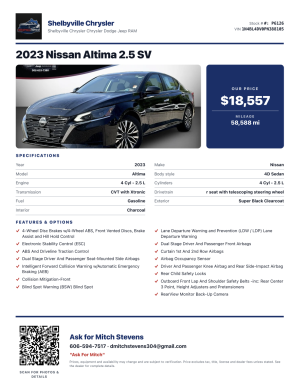
Open any vehicle page on your dealer site, press Capture, then Print window sticker. You get a one-page, letter-size sticker with:
2. Change the photo background
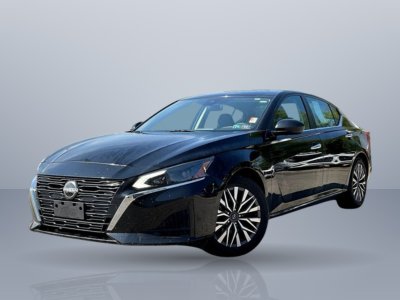
Lot photos with cones, other cars and a dumpster in the back don't help anyone. The Showroom photos button cuts the car out and puts it on a clean studio background: white, gray, dark showroom or blue showroom, with a floor shadow and reflection. A before/after slider lets you compare, and you can undo any photo you don't like. The new photos carry straight into your Marketplace and Instagram drafts and your Reels.
(The background removal runs through remove.bg on your own account, so each photo uses one of their credits.)
What else it does
Happy to answer questions here.
Mitch
Postads4U
I'm a car salesman, and I got tired of re-typing the same vehicle info into Marketplace, Instagram and window stickers. So I built a Chrome extension called Postads4u Studio. I just added two features I think some of you might get use out of, and I'd love honest feedback.
1. Window stickers in one click
Open any vehicle page on your dealer site, press Capture, then Print window sticker. You get a one-page, letter-size sticker with:
- Year, make, model, trim, price and mileage
- A photo of the car
- A specs table (engine, transmission, drivetrain, colors, VIN, stock #)
- The top features pulled from the listing
- Your name, phone and dealership logo
- A QR code that opens the car's listing, so a customer on the lot can scan it and see every photo
2. Change the photo background
Lot photos with cones, other cars and a dumpster in the back don't help anyone. The Showroom photos button cuts the car out and puts it on a clean studio background: white, gray, dark showroom or blue showroom, with a floor shadow and reflection. A before/after slider lets you compare, and you can undo any photo you don't like. The new photos carry straight into your Marketplace and Instagram drafts and your Reels.
(The background removal runs through remove.bg on your own account, so each photo uses one of their credits.)
What else it does
- Builds Facebook Marketplace and Instagram drafts from the dealer page. It never hits Post for you; you review and publish.
- Makes vertical Reels from the photos, with music, your logo, and a QR end card
- Works with most dealer website platforms (Dealer.com, DealerOn, DealerInspire, DealerCarSearch, etc.)
Happy to answer questions here.
Mitch
Postads4U


