


I checked with Jeff before posting this and he pointed me to Vendor Announcements. I’ve been asking a few questions on here recently about inventory photography and what actually happens once a car’s been shot.
Part of the reason is that I’ve been building something called LotKit.
The basic idea is pretty straightforward: give it the VIN and the finished photo set, order the photos how you want them, and it packages them into consistently named files alongside the window sticker and a draft Buyers Guide. Once you’re done, it creates one link you can hand back to the dealership with the vehicle files in one place.
These screenshots are from a demo run using test dealership details and synthetic vehicle photos.
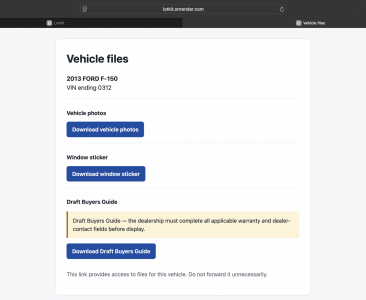
This is what the dealer gets on the other end:
View attachment 11586
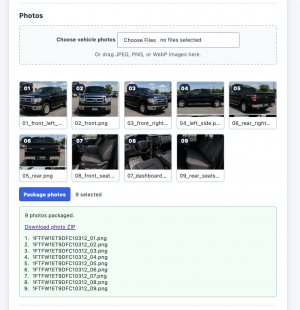
On my side, the finished photos can be ordered and packaged into a consistently named ZIP:
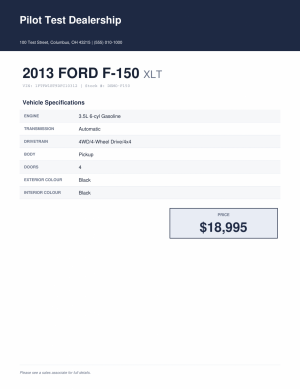
And this is the window sticker generated for the same demo vehicle:
The Buyers Guide part is deliberately a draft. LotKit fills the vehicle information, but the dealership still has to review and complete the applicable warranty and dealer-contact fields before it can be displayed. I didn’t want the software making those decisions on the dealer’s behalf.
It all works on my test runs. What I don’t know yet is whether it works in a way that’s actually useful to somebody doing this every day. So if you shoot or merchandise inventory for dealers, I’d genuinely like you to pick this apart. What’s useful here? What’s redundant? What have I misunderstood? If your existing setup already handles all of this better, tell me that too. That’s useful for me to know.
I’m also looking for a couple of people who’d be willing to run one real vehicle through it with me. No charge and I’ll handle the setup. I mainly want to see what happens when this touches an actual job instead of another test run.
If you’re up for that, reply here or PM me.
Cheers,
Ayush
Part of the reason is that I’ve been building something called LotKit.
The basic idea is pretty straightforward: give it the VIN and the finished photo set, order the photos how you want them, and it packages them into consistently named files alongside the window sticker and a draft Buyers Guide. Once you’re done, it creates one link you can hand back to the dealership with the vehicle files in one place.
These screenshots are from a demo run using test dealership details and synthetic vehicle photos.
This is what the dealer gets on the other end:
View attachment 11586
On my side, the finished photos can be ordered and packaged into a consistently named ZIP:
And this is the window sticker generated for the same demo vehicle:
The Buyers Guide part is deliberately a draft. LotKit fills the vehicle information, but the dealership still has to review and complete the applicable warranty and dealer-contact fields before it can be displayed. I didn’t want the software making those decisions on the dealer’s behalf.
It all works on my test runs. What I don’t know yet is whether it works in a way that’s actually useful to somebody doing this every day. So if you shoot or merchandise inventory for dealers, I’d genuinely like you to pick this apart. What’s useful here? What’s redundant? What have I misunderstood? If your existing setup already handles all of this better, tell me that too. That’s useful for me to know.
I’m also looking for a couple of people who’d be willing to run one real vehicle through it with me. No charge and I’ll handle the setup. I mainly want to see what happens when this touches an actual job instead of another test run.
If you’re up for that, reply here or PM me.
Cheers,
Ayush