

G
Guest Poster
Guest
Google Maps and Geo Targeting Your Websites
Google Maps is the #1 organic advertising tool for most car dealers but how Google Maps actually works is a mystery to many of us in the SEO community. For example, one New Jersey car dealer's Google Maps listing is displayed over 17,000 a month.
What has been a challenge for many car dealers is determining why certain car dealer listings show in Google Maps when consumers do a county or statewide search. I have tested hundreds of scenarios where a Google Local Business listing is correct but it does not show for searches that you would expect it to appear.
With GPS enabled mobile phones and geo targeted search marketing applications like FourSquare.com on the rise, I started to look into how websites are geo-targeted. It started with a conversation with Alex Snyder at Checkered Flag because all his dealer websites are a sub-domain off of www.checkeredflag.com and not on a standalone domain name. What that means is that Checkered Flag Toyota is located at http://toyota.checkeredflag.com and not on www.checkeredflagtoyota.com.
In the case of all the Checkered Flag store websites, they are hosted off a primary domain and Google Maps was not behaving properly for some of the store listings. As Alex and I discussed this matter, Alex took it on his own initiative to see how other franchise chains handled mapping multiple stores off a central website.
Alex found that Best Buy (www.bestbuy.com) had a directory page for each store in their chain and that each page showed very well in organic search as well as in Google Maps. When we looked deeper, we found that each store listing page had implemented GEO tags on the page using longitude and latitude settings.
When I searched for the Best Buy store in Eatontown New Jersey the top search result was: Best Buy in Eatontown, NJ - 50 State Route 36 - Electronics, Appliances & More . You will notice that just like Checkered Flag, all the stores are pages in a sub-domain but Best Buy was NOT having any issue with Google Maps and search results.
When you view the source code for this page two things jumped out at me; one line in the HEAD and one line in an H1 tag:
It looks like Best Buy added GEO tags to their store location in the H1 tag. This was the first time I saw GEO tags in an H1 tag, which got me motivated to take some time into understanding the purpose of the GEO tags.
My research showed that there are a few ways to implement GEO tagging, one is using this W3 syntax formatting and a second way was using META tags.
GEO Tagging In WordPress
I asked my WordPress programming team how they would implement GEO tagging in a php environment and after some research, they decided that it would be better to add the GEO tags in the META data.
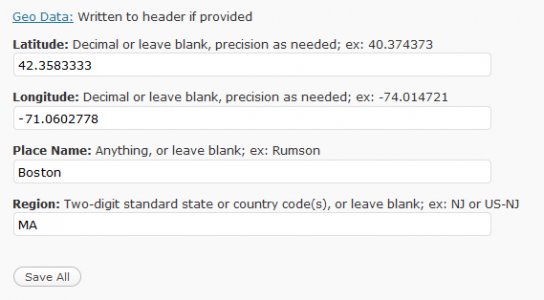
So we created a WordPress plug-in that allows the longitude and latitude to be entered via the control panel. With this plug-in installed, WordPress microsites will turn this data into commands in the HEAD tags of the website pages. These are the tags for our Boston car dealers website at www.bostondealers.org:
<meta name="ICBM" content="42.3583333,-71.0602778">
<meta name="geo.position" content="42.3583333;-71.0602778">
<meta name="geo.placename" content="Boston">
<meta name="geo.region" content="MA">
Car Dealer Website Platforms Should Add GEO Tags
I'm writing this article because I want to challenge the automotive website community to implement GEO tagging for car dealer websites. The ideal tags for dealer websites should be the EXACT latitude and longitude that Google Maps displays for their local business listing
With a tsunami of website applications that are GEOP aware, I think it will be important for car dealers to have the correct GEO tags on their websites.
Getting The Correct GEO Tags For Your Store
You can get the latitude and longitude from your Google Local Business listing by following the steps below:
1. Search your business name so that Google Maps appear
2. Copy the EXACT street address you have displayed on your business listing.
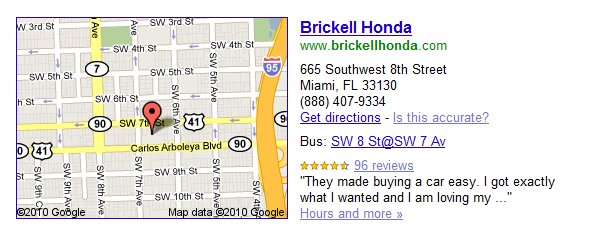
3. Go To Google Maps
4. Paste the EXACT Street Address and search Google Maps

5. When your map comes up, click on the "Link" button on the upper right corner to display the hyperlink to your business listing:
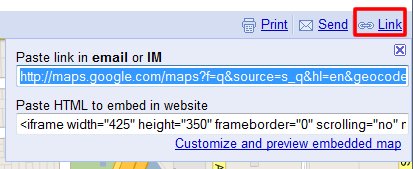
6. Copy the link into a text editor. The text looks like this:

 maps.google.com
7. The Latitude and Longitude that GOOGLE uses in shown in RED and GREEN. Notice that the GREEN number is negative.
8. Use these two numbers for the GEO tags on the Home Page of your website.
Do GEO Tags Matter?
Some have said that GEO tags on a website do not matter. You can even find some articles where Google says that they ignore these tags. In my opinion, regardless of what Google says, GEO tags will be important to ensure that your website shows properly in local search.
I have a hunch that adds GEO tags will be a benefit to car dealers as well as creating more external links to your Google Business listing page. Time will tell...
Google Maps is the #1 organic advertising tool for most car dealers but how Google Maps actually works is a mystery to many of us in the SEO community. For example, one New Jersey car dealer's Google Maps listing is displayed over 17,000 a month.
What has been a challenge for many car dealers is determining why certain car dealer listings show in Google Maps when consumers do a county or statewide search. I have tested hundreds of scenarios where a Google Local Business listing is correct but it does not show for searches that you would expect it to appear.
With GPS enabled mobile phones and geo targeted search marketing applications like FourSquare.com on the rise, I started to look into how websites are geo-targeted. It started with a conversation with Alex Snyder at Checkered Flag because all his dealer websites are a sub-domain off of www.checkeredflag.com and not on a standalone domain name. What that means is that Checkered Flag Toyota is located at http://toyota.checkeredflag.com and not on www.checkeredflagtoyota.com.
In the case of all the Checkered Flag store websites, they are hosted off a primary domain and Google Maps was not behaving properly for some of the store listings. As Alex and I discussed this matter, Alex took it on his own initiative to see how other franchise chains handled mapping multiple stores off a central website.
Alex found that Best Buy (www.bestbuy.com) had a directory page for each store in their chain and that each page showed very well in organic search as well as in Google Maps. When we looked deeper, we found that each store listing page had implemented GEO tags on the page using longitude and latitude settings.
When I searched for the Best Buy store in Eatontown New Jersey the top search result was: Best Buy in Eatontown, NJ - 50 State Route 36 - Electronics, Appliances & More . You will notice that just like Checkered Flag, all the stores are pages in a sub-domain but Best Buy was NOT having any issue with Google Maps and search results.
When you view the source code for this page two things jumped out at me; one line in the HEAD and one line in an H1 tag:
- xmlns:geo="http://www.w3.org/2003/01/geo/wgs84_pos#"
- <h1 property="geo:lat_long" content="40.2908597,-74.0503975">Best Buy - Eatontown</h1>
It looks like Best Buy added GEO tags to their store location in the H1 tag. This was the first time I saw GEO tags in an H1 tag, which got me motivated to take some time into understanding the purpose of the GEO tags.
My research showed that there are a few ways to implement GEO tagging, one is using this W3 syntax formatting and a second way was using META tags.
GEO Tagging In WordPress
I asked my WordPress programming team how they would implement GEO tagging in a php environment and after some research, they decided that it would be better to add the GEO tags in the META data.
So we created a WordPress plug-in that allows the longitude and latitude to be entered via the control panel. With this plug-in installed, WordPress microsites will turn this data into commands in the HEAD tags of the website pages. These are the tags for our Boston car dealers website at www.bostondealers.org:
<meta name="ICBM" content="42.3583333,-71.0602778">
<meta name="geo.position" content="42.3583333;-71.0602778">
<meta name="geo.placename" content="Boston">
<meta name="geo.region" content="MA">
Car Dealer Website Platforms Should Add GEO Tags
I'm writing this article because I want to challenge the automotive website community to implement GEO tagging for car dealer websites. The ideal tags for dealer websites should be the EXACT latitude and longitude that Google Maps displays for their local business listing
With a tsunami of website applications that are GEOP aware, I think it will be important for car dealers to have the correct GEO tags on their websites.
Getting The Correct GEO Tags For Your Store
You can get the latitude and longitude from your Google Local Business listing by following the steps below:
1. Search your business name so that Google Maps appear
2. Copy the EXACT street address you have displayed on your business listing.
3. Go To Google Maps
4. Paste the EXACT Street Address and search Google Maps
5. When your map comes up, click on the "Link" button on the upper right corner to display the hyperlink to your business listing:
6. Copy the link into a text editor. The text looks like this:
Google Maps
Find local businesses, view maps and get driving directions in Google Maps.
maps.google.com
7. The Latitude and Longitude that GOOGLE uses in shown in RED and GREEN. Notice that the GREEN number is negative.
8. Use these two numbers for the GEO tags on the Home Page of your website.
Do GEO Tags Matter?
Some have said that GEO tags on a website do not matter. You can even find some articles where Google says that they ignore these tags. In my opinion, regardless of what Google says, GEO tags will be important to ensure that your website shows properly in local search.
I have a hunch that adds GEO tags will be a benefit to car dealers as well as creating more external links to your Google Business listing page. Time will tell...


