• Stop being a LURKER - join our dealer community and get involved. Sign up and start a conversation.

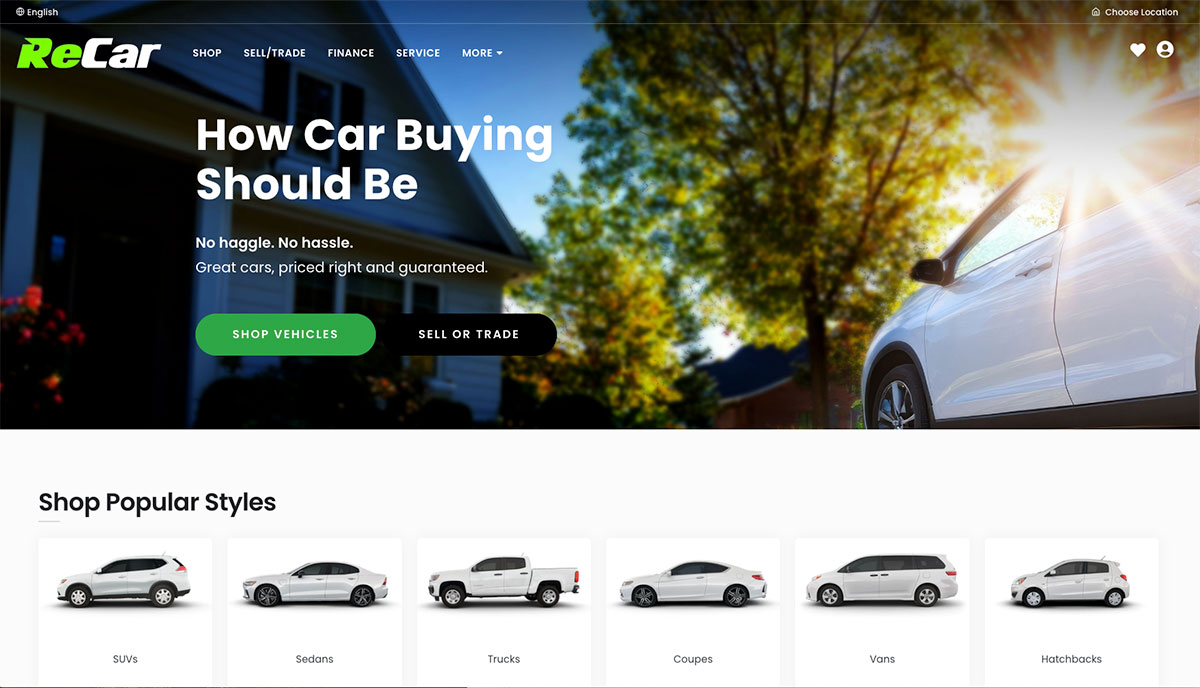
What Should the Perfect Dealership Home Page Look Like?

Solid breakdown and the speed-first mindset is spot on. One small tweak I’d test is adding a single micro-CTA in the hero (like a trust or utility hook) for users not ready to browse inventory yet. Overall the flow feels intentional and conversion-focused without clutter rarely done this clean.

That same principle of clarity and fit applies in parts sourcing too specialized categories like
mangueras Colombia work best when users immediately understand purpose, compatibility, and value without extra friction.
 
  • Like
Reactions: DjSec
I feel decent page speed matters but far from everything. For example visiting the site I get an ssl warning (I’m guessing you are linking to external scripts that aren’t https). The layout feels a little 2005.

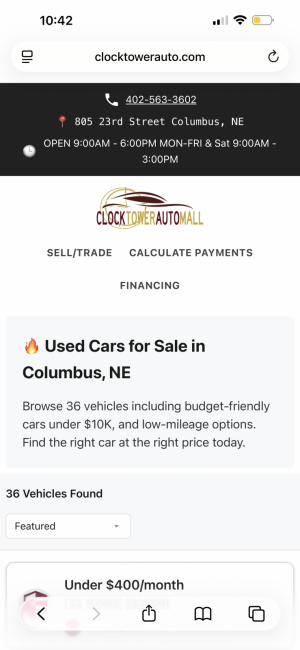
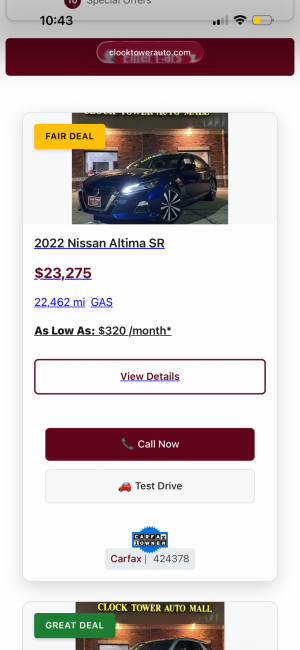
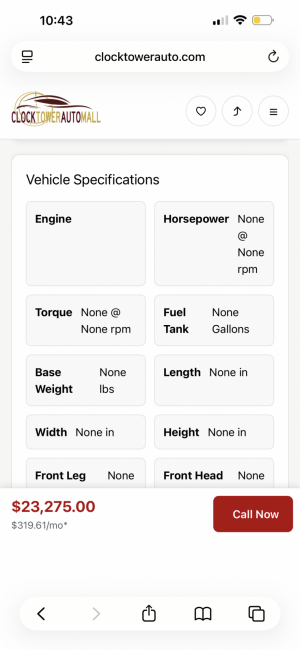
Doesn’t present that well on mobile with bad wrapping and wasted space trying to show icons, and icon description and the value for that icon. The VLP has much to be desired with nothing of interest above the fold initially and a quirky odd thrown together layout of each vehicle.

You said it’s in the works so maybe a ways to go yet.

I appreciate the challenges and there may limitations I’m not aware. To be fair I completed this site recently and it’s always a work in progress. And I’m not a fan of the annoying chat but was forced to compromise lol


Attachments

  • IMG_2547.png
    IMG_2547.png
    641 KB · Views: 2
  • IMG_2548.png
    IMG_2548.png
    716.2 KB · Views: 2
  • IMG_2549.png
    IMG_2549.png
    495.1 KB · Views: 2
  • Like
Reactions: DjSec
What platform is clocktowerauto.com built in? Who is the Provider? Seems alot like a overfuel site.
ClockTowerAuto is built in Django and Python, not a template platform and is designed from the ground up for performance, accessibility, and SEO.

OverFuel publicly claims to build the fastest automotive websites in the industry. That’s a measurable claim, so let’s measure it.

Google’s Core Web Vitals benchmarks are clear:
  • First Contentful Paint (FCP): under 1 second
  • Largest Contentful Paint (LCP): under 2.5 seconds
Using PageSpeed Insights, we can test the sites OverFuel themselves showcase on their homepage.

Here are real-world results (mobile):
  • almcars — 2.2s FCP / 8.9s LCP
  • bobrutherford — 3.2s FCP / 5.4s LCP
  • bradenauto — 1.8s FCP / 8.8s LCP
  • blackwellkia — 3.3s FCP / 20.8s LCP
  • cabledahmer — 1.9s FCP / 4.3s LCP
  • dellspowersports — 7.4s FCP / 23.9s LCP
  • clementautogroup — 1.5s FCP / 11.5s LCP
  • fishersimports — 2.5s FCP / 9.2s LCP
  • gravityautos — 1.2s FCP / 9.2s LCP
  • budclary — 1.2s FCP / 3.2s LCP
None of these sites meet Google’s recommended performance thresholds.

This isn’t about what can’t be done OverFuel’s own website proves they know how to do it. The issue is that this level of performance isn’t being delivered to their clients.

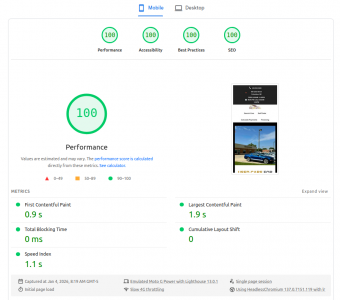
ClockTowerAuto does meet these benchmarks, and we have live data to prove it.

clocktower.png
Performance is only part of the story.

OverFuel also claims to build high-ranking websites. However, Google explicitly states that Core Web Vitals and accessibility are ranking factors.

ClockTowerAuto is designed to be ADA compliant by default.

A quick accessibility scan shows OverFuel client sites are not ADA compliant, which exposes dealerships to real legal and financial risk. Their own site is compliant however their clients’ sites are not.

Shows they do understand the risk ...

On the SEO side, ClockTowerAuto includes:
  • Blog posts with FAQ, overview, and advanced schema
  • Search Result Pages (SRPs) that can be created instantly
  • Internal linking between content and SRPs designed to rank
  • Zero page builders, zero bloated JS frameworks
You enter a name and you have an SEO-ready SRP.

We’re not finished building. We’re early.

But ClockTowerAuto is doing what others claim to do, with proof instead of marketing.

We’re just getting started. This is our first dealership website, and it’s been built with a performance-first, accessibility-first mindset from day one.

We’re continuously refining and improving it, and a second dealership site is already in progress.

The difference is simple: we measure, we test, and we improve based on data not marketing claims.
 
I feel decent page speed matters but far from everything.
Page speed isn’t everything, but it is foundational. Google has been explicit that Core Web Vitals, crawl efficiency, and real-world user metrics directly affect indexing, rankings, and conversions. A site can be beautiful, but if it’s slow or unstable, users bounce and Google sees that immediately.

That said, performance alone doesn’t carry a site layout, UX, and clarity absolutely matter, and those are actively being refined.
I feel decent page speed matters but far from everything. For example visiting the site I get an ssl warning (I’m guessing you are linking to external scripts that aren’t https).

Regarding the SSL warning I haven’t been able to reproduce that yet, but if you saw it, I take that seriously. I’ll run additional checks to identify whether there’s a mixed-content request or an external asset misconfigured. If you have a screenshot, I’d genuinely appreciate it.

The layout feels a little 2005.
I’m open to specifics. The design intentionally avoids heavy JS frameworks and page builders to preserve speed and crawlability, but that doesn’t mean the presentation can’t be cleaner. If there are particular patterns or sections that feel dated, I’m happy to adjust.
Doesn’t present that well on mobile with bad wrapping and wasted space trying to show icons, and icon description and the value for that icon.
The icon + label + value layout is being actively reworked right now to reduce wrapping and wasted space. This is one of those trade-offs where performance-first decisions sometimes expose UX edges that need polish.
The VLP has much to be desired with nothing of interest above the fold initially and a quirky odd thrown together layout of each vehicle.
The current focus is on immediate vehicle identification (year, make, model, imagery) with minimal layout shift, but I’m experimenting with stronger above-the-fold signals like CTAs, pricing emphasis, and intent-based actions.

If you’re willing, I’d genuinely value screenshots or examples of layouts you feel execute this better, especially on mobile.

I’m not positioning this as “finished”, it’s a performance-driven foundation that’s being refined daily. The goal is to balance speed, accessibility, SEO, and usability without sacrificing one for the others.
 
Last edited:
Page speed isn’t everything, but it is foundational. Google has been explicit that Core Web Vitals, crawl efficiency, and real-world user metrics directly affect indexing, rankings, and conversions. A site can be beautiful, but if it’s slow or unstable, users bounce and Google sees that immediately.

That said, performance alone doesn’t carry a site layout, UX, and clarity absolutely matter, and those are actively being refined.


Regarding the SSL warning I haven’t been able to reproduce that yet, but if you saw it, I take that seriously. I’ll run additional checks to identify whether there’s a mixed-content request or an external asset misconfigured. If you have a screenshot, I’d genuinely appreciate it.


I’m open to specifics. The design intentionally avoids heavy JS frameworks and page builders to preserve speed and crawlability, but that doesn’t mean the presentation can’t be cleaner. If there are particular patterns or sections that feel dated, I’m happy to adjust.

The icon + label + value layout is being actively reworked right now to reduce wrapping and wasted space. This is one of those trade-offs where performance-first decisions sometimes expose UX edges that need polish.

The current focus is on immediate vehicle identification (year, make, model, imagery) with minimal layout shift, but I’m experimenting with stronger above-the-fold signals like CTAs, pricing emphasis, and intent-based actions.

If you’re willing, I’d genuinely value screenshots or examples of layouts you feel execute this better, especially on mobile.

I’m not positioning this as “finished”, it’s a performance-driven foundation that’s being refined daily. The goal is to balance speed, accessibility, SEO, and usability without sacrificing one for the others.
I did mention maybe it’s still in the works so that’s awesome. Its definitely a process and no shortage of opinions I find lol
 
  • Like
Reactions: DjSec
Hi, DjSec. Overfuel sales and marketing guy here. Our technical wizards are wrapped up.

First off, I want to congratulate you jumping into the website business. Believe it or not, we think competition is healthy for the auto space.

Lab data (simulated data) vs. field data (real-world users data)

While lab data is helpful for developers like you (and those devs on our team) to get a directional sense of how new coding work might perform in the wild, we focus on the real-world CrUX assessment Google is using to reward/punish sites and generally signal if a site is shopper-friendly or not: Core Web Vitals (CWV).

Shift Digital's 2025 Pulse Report stated $30 of every $100 spent driving shoppers to a dealer site is WASTED when failing CWV.

With lab data, you can run a PageSpeed Insights report one minute and another 5 minutes later and get dramatically different results (see more below).

CWV

As you know, CWV is only measuring Largest Contentful Paint (LCP), Interaction to Next Paint (INP), and Cumulative Layout Shift (CLS). Sharing this for the general audience that likely doesn't know the technical nuance of lab data vs field data.

These are the three KPIs dealers need to focus on when it comes to website technical performance.

About CWV from Google:

The 28-day rolling average for Core Web Vitals (CWV) is the cornerstone of Google’s field data, representing the aggregate user experience for a website over the previous 28 days. This metric, used in the Chrome User Experience Report (CrUX) and Search Console, is designed to smooth out daily fluctuations and provide a stable view of performance, rather than reflecting real-time changes.

Opinions vs. Data

Couldn't agree with you more.

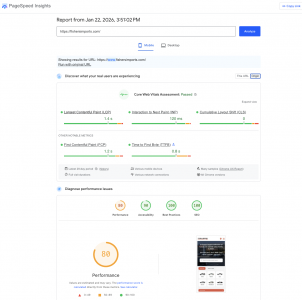
For our client Fishers Imports, you reported:

  • fishersimports — 2.5s FCP / 9.2s LCP

Not only does the site PASS CWV for mobile and desktop [Origin Mode], using REAL-WORLD CrUX data... FCP was 1.2s and LCP was 1.4s:

Fishers imports.png

This CWV assessment is standard out-of-box performance for Overfuel websites when we are able to keep the dealer from adding outdated technology that breaks performance, abusing GTM instances, etc. (IFYKYK)

If you're using lab data to diagnose legal liability regarding ADA accessibility -- WHICH WE BELIEVE NO DEALER SHOULD DO -- Fisher's score is 90.

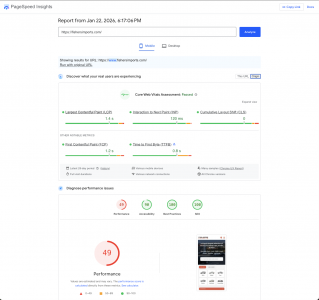
Ran a second report on Fishers to gauge the volatility in lab data results (literally NOTHING changed on the site):

Screenshot 2026-01-22 at 6.17.48 PM.png

CWV KPIs, the real-world data, remain unchanged, of course.

However, the lab (simulated data) saw performance score drop from 80 to 49.

NOTE: Fishers still at a 90 on accessibility.

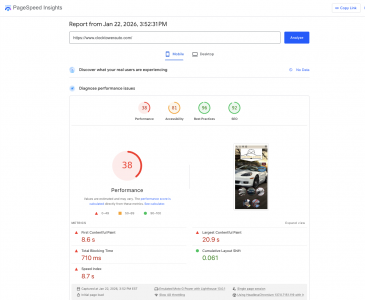
Let's check on Clocktower Auto:

Clocktower Auto.png

Site is not seeing enough consumer visits to generate a CWV assessment for mobile or desktop. The dealership's based in a market with a population of ~25k, so it's not that surprising.

NOTE: Accessibility is an 81.

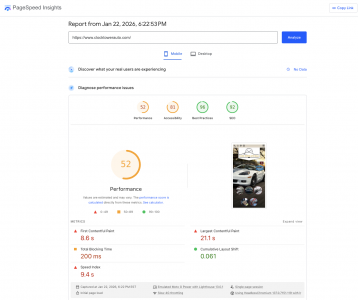
Second test (I assume nothing changed):

Screenshot 2026-01-22 at 6.23.30 PM.png

Site still not passing CWV -- as expected -- but lab data-driven performance score jumps from 38 to 52. The other three KPIs held.

Accessibility score at 81 for both reports. Again, we DO NOT RECOMMEND anyone use this simulated score as a definitive measure of accessibility risk.

Conclusions

Lab data (simulated data) is a necessary tool to help developers make best guesses at how website tweaks will perform in the real world, pre-deployment.

CWV assessments are where the rubber meets the road and reveal real-world shopper experiences with your website. Also, Google is rewarding and punishing to some degree based on the assessment result.

Your assertion that Overfuel creates outsized legal liability for dealers is factually incorrect and misrepresents our platform in a way that could be harmful to the business. Additionally, for those looking, we are fans of accessiBe -- good tech.
 
Lab data (simulated data) vs. field data (real-world users data)

While lab data is helpful for developers like you (and those devs on our team) to get a directional sense of how new coding work might perform in the wild, we focus on the real-world CrUX assessment Google is using to reward/punish sites and generally signal if a site is shopper-friendly or not: Core Web Vitals (CWV).
CrUX determines how Google evaluates real-world performance outcomes for ranking purposes.

Lighthouse is a diagnostic and auditing tool used to identify technical, performance, and accessibility issues.

Good CrUX does not invalidate Lighthouse findings; it simply means average users are not currently experiencing severe performance friction.

Common reasons CrUX looks good while Lighthouse looks bad:
  • Heavy desktop traffic masking poor mobile UX
  • Repeat users benefiting from cache
  • CDN warming effects
  • Low traffic volume smoothing data
  • Broken experiences affecting a small but legally relevant population
Shift Digital's 2025 Pulse Report stated $30 of every $100 spent driving shoppers to a dealer site is WASTED when failing CWV.

This is marketing math, not a proven causal claim.

With lab data, you can run a PageSpeed Insights report one minute and another 5 minutes later and get dramatically different results (see more below).

Run-to-run variance in Lighthouse is expected and documented, but that does not invalidate the diagnostic value of the metrics. In practice, Lighthouse is used to identify persistent patterns and root causes, not to chase single-run scores. Volatility itself often indicates non-deterministic or third-party-driven performance issues rather than noise.

CWV

As you know, CWV is only measuring Largest Contentful Paint (LCP), Interaction to Next Paint (INP), and Cumulative Layout Shift (CLS). Sharing this for the general audience that likely doesn't know the technical nuance of lab data vs field data.

These are the three KPIs dealers need to focus on when it comes to website technical performance.

CWV reflects three important real-user outcome metrics, but it is not a comprehensive measure of technical performance. CWV validates outcomes; diagnostic tools are required to understand causes and risk.

For our client Fishers Imports, you reported:

Not only does the site PASS CWV for mobile and desktop [Origin Mode], using REAL-WORLD CrUX data... FCP was 1.2s and LCP was 1.4s:

View attachment 9695

Good CrUX + poor Lighthouse usually means the site performs well for most returning or cached users, but has real problems for first-time users, edge cases, or constrained devices.

Common causes (which your Lighthouse report literally shows):
  • Heavy unused JS (230 KiB)
  • Long main-thread tasks
  • Third-party scripts
  • Non-deterministic rendering
  • Accessibility violations (labels, contrast, landmarks)

These issues:
  • Often don’t move CrUX averages
  • Do affect individual users
  • Do create legal and UX risk
  • Do show up clearly in Lighthouse

So Lighthouse isn’t contradicting CrUX it’s revealing what CrUX hides.

This CWV assessment is standard out-of-box performance for Overfuel websites when we are able to keep the dealer from adding outdated technology that breaks performance, abusing GTM instances, etc. (IFYKYK)

If you're using lab data to diagnose legal liability regarding ADA accessibility -- WHICH WE BELIEVE NO DEALER SHOULD DO -- Fisher's score is 90.

Ran a second report on Fishers to gauge the volatility in lab data results (literally NOTHING changed on the site):

CWV outcomes and Lighthouse diagnostics serve different purposes. CWV reflects historical averages, while Lighthouse identifies deterministic performance and accessibility issues that may not materially affect CrUX aggregates but still impact individual users. Dismissing lab findings entirely conflates outcome validation with risk assessment.

Let's check on Clocktower Auto:
My site was only live with Clocktower Auto for a little over a month, I went live durian the holidays, sales dropped and I got blammed.

However as you said, CWV cannot be used to evaluate real-world performance in that case. In the absence of field data, Lighthouse diagnostics are the appropriate tool for identifying first-load behavior, architectural issues, and accessibility signals. While Lighthouse scores may fluctuate, the underlying findings remained consistent across runs, which is precisely the intended use of lab diagnostics.

I'll setup another site over the weekend for you to take a look at.

Again, we DO NOT RECOMMEND anyone use this simulated score as a definitive measure of accessibility risk.
To clarify, I’m not suggesting Lighthouse or any lab tool should be used as a definitive determination of ADA compliance. That would be incorrect. Lighthouse is useful for identifying known accessibility barriers and prioritizing manual testing, not for issuing legal judgments.

Where concern arises is with the use of accessibility overlays. Overlays do not make a site ADA or WCAG compliant, because they introduce a separate, opt-in experience that requires user interaction and does not address the underlying semantic and structural issues in the site. In practice, overlays remediate only a subset of issues and do not provide an equivalent experience for users with and without disabilities.

Industry guidance and case law increasingly recognize that accessibility must be built into the core experience rather than layered on top of it.


Conclusions

Lab data (simulated data) is a necessary tool to help developers make best guesses at how website tweaks will perform in the real world, pre-deployment.

CWV assessments are where the rubber meets the road and reveal real-world shopper experiences with your website. Also, Google is rewarding and punishing to some degree based on the assessment result.

CWV shows how the road has felt to most users over the past 28 days. Lab diagnostics are what tell you whether the road is structurally sound.

Your assertion that Overfuel creates outsized legal liability for dealers is factually incorrect and misrepresents our platform in a way that could be harmful to the business. Additionally, for those looking, we are fans of accessiBe -- good tech.

I want to be precise here, because accuracy matters for both sides.

My position is not that Overfuel intentionally creates legal liability, nor that it is uniquely negligent. The point is structural: platforms that rely on third-party accessibility overlays or widgets (including accessiBe or similar tools) are not, by definition, fully ADA or WCAG compliant and do not materially reduce legal exposure for dealers.

Your statement that you are “fans of accessiBe” reinforces this distinction rather than contradicts it.

Accessibility overlays:
  • Do not remediate underlying semantic, structural, or interaction-level accessibility failures
  • Do not satisfy WCAG conformance requirements on their own
  • Have been explicitly cited in multiple DOJ statements and court filings as insufficient for ADA compliance
  • Are frequently referenced in demand letters and lawsuits as evidence of attempted, not achieved, compliance
As a result, platforms that require or recommend overlays are inherently shifting compliance responsibility and therefore risk back to the dealer.

This is not a judgment of intent or quality of engineering effort. It is simply the current legal and technical reality of accessibility enforcement in the U.S.

My original assertion stands on that basis alone: true ADA compliance must be built into the platform itself, not added post-hoc via overlays. Anything short of that leaves dealers exposed, regardless of good faith or tooling choices.

If you believe your platform achieves WCAG 2.1 AA (or higher) conformance without reliance on third-party overlays, I’m happy to review that claim on technical merits.

 
Last edited: